
HTML for Gadgets, lesson 2 of 9
Your First Page: the Skeleton of Every Gadget Page
Introduction
Every page your ESP32 sends has the same skeleton. Learn it once and you can reuse it in every project. Today you'll write that skeleton and put a heading and some words on it.
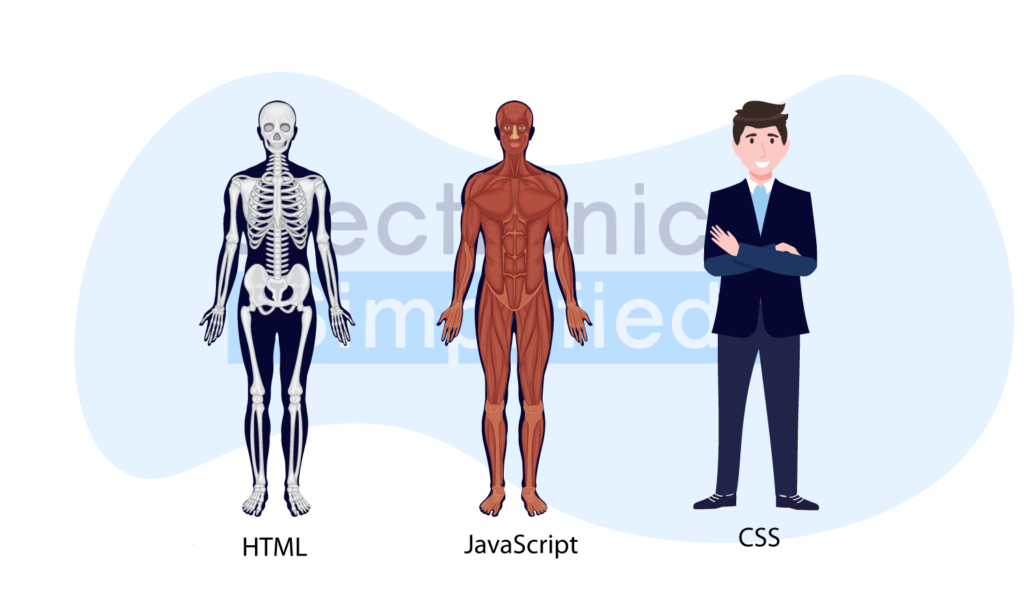
HTML (HyperText Markup Language) gives a page its structure, like a skeleton. CSS is the clothes (colours and sizes), and JavaScript is the nervous system (things that move or react). For gadget pages, HTML does most of the work.
Working principle
HTML is made of tags. Most come in pairs: an opening tag like <h1> and a closing tag like </h1>, with a forward slash. Whatever is between them gets that meaning.
<!DOCTYPE html>
<html>
<head>
  <meta charset="utf-8">
  <meta name="viewport" content="width=device-width, initial-scale=1">
  <title>My Smart Room</title>
</head>
<body>
  <h1>My Smart Room</h1>
  <p>Hello! This page lives inside my ESP32.</p>
  <p>Soon it will switch my <b>light</b> and <b>fan</b>.</p>
</body>
</html>| Tag | Name | What it does |
|---|---|---|
<h1> to <h6> | Headings | Big to small titles |
<p> | Paragraph | A block of text |
<b> | Bold | Makes words bold |
<img src="…"> | Image | Shows a picture (src says which file) |
Don't worry about the two <meta> lines yet. Lesson 3 explains them.
What you'll need
- A web browser (Chrome, Edge, Firefox or Safari).
- A text editor: VS Code or Sublime Text. Or just use the playground below.
Try it
Change the heading to your own room's name, then add another <p> line.
Change the heading to your own room's name, then add another <p> line.
To try it on your computer, save the code as first_page.html and double-click it. You can also download the original activity files.
Check what you learnt
Which part of the page holds everything you see on the screen?
How is a closing tag different from an opening tag?
Which tag makes the biggest heading?
Conclusion
- Every gadget page has the same skeleton:
html,headandbody. - Tags come in pairs, and the closing tag has a
/. h1andpare enough to put a title and words on the page.
What next?
Make it fit the phone: why the <meta name="viewport"> line matters on a phone.